

PROP — A Live Operator Panel for FreePBX and Asterisk
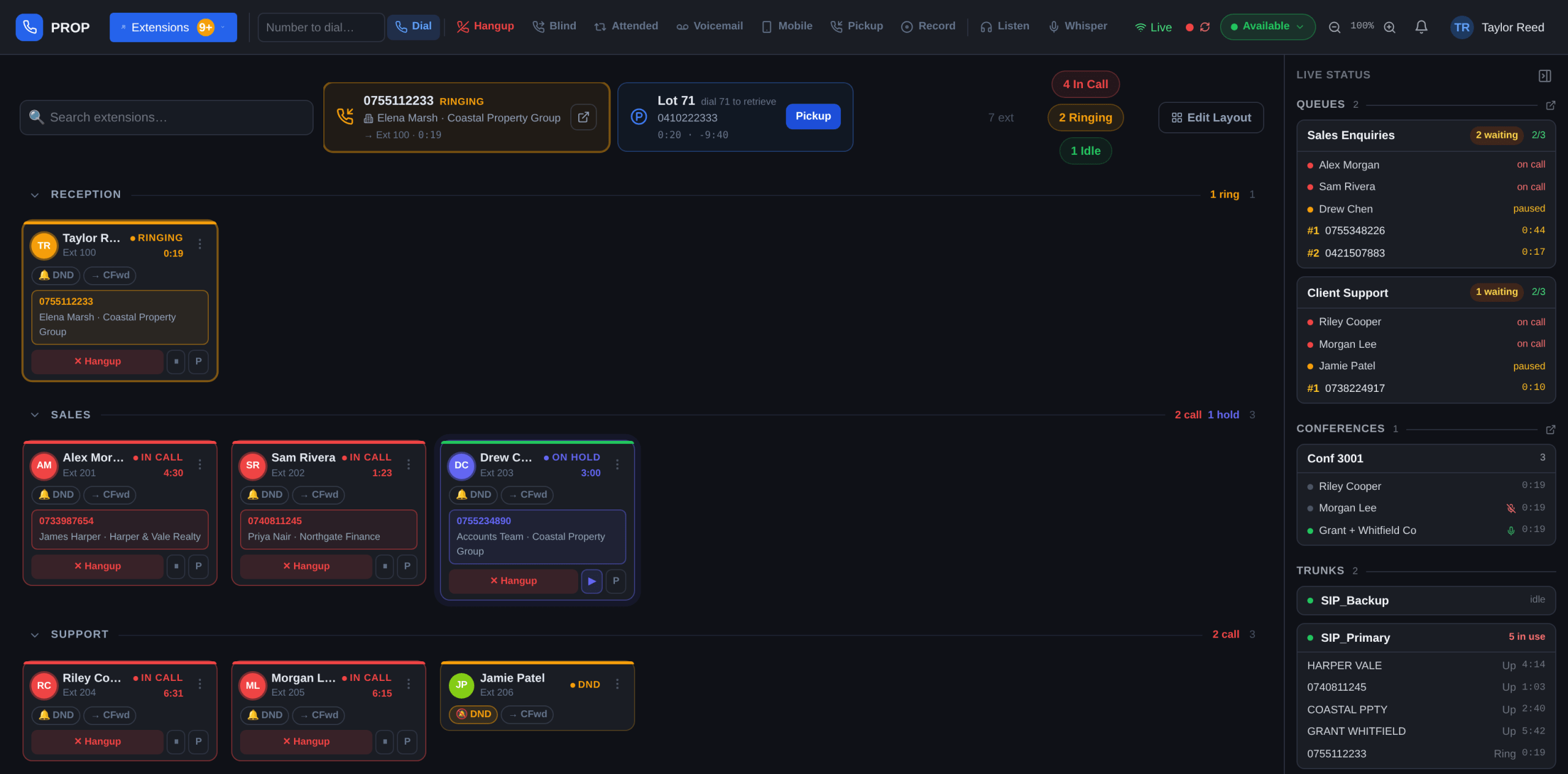
PROP (PHP React Operator Panel) is a self-hosted operator console for Asterisk and FreePBX phone systems, built by Mobile Techs as a replacement for FOP2. Receptionists, support teams and managers get one live view of every extension, queue, conference, trunk and call in progress, with one-click call control, drag-and-drop transfer, team chat, call history and queue reporting, and zero-touch desk-phone provisioning underneath.
It runs on your own server, so call records and staff information stay on your infrastructure. There is no desktop client to deploy and no per-seat licence. Every card updates over a single WebSocket connection, and the server checks every action against a role-based permission model before it runs. Get in touch for a free consultation.
What PROP Puts on One Screen
Live Extension Board (BLF)
A colour-coded grid of every extension, grouped the way your team works. Ringing, connected, on hold and Do-Not-Disturb changes reach every connected browser. Drag a live call from one card onto another to transfer it, with no feature codes to memorise.
Live Status Sidebar
Queues, conferences and trunks sit beside the board, so nobody switches tabs. Each queue card lists agents with a status dot and waiting callers with a position and a running timer. Each trunk shows whether it is reachable and how many lines are in use.
Queue Management
Wait times change colour once a caller passes your service-level target, so a team lead spots a queue at risk from across the room. Agents pause with a reason the whole team can see, and join or leave a queue in one click.
Call History & Follow-Ups
Inbound, outbound and internal calls are logged with who called, who answered, the wait, the talk time and the outcome. The Follow-ups view lists unreturned callers from the past fortnight, and clears an entry from every screen the moment someone rings back.
Conferences & Call Parking
See who has joined a bridge and who is speaking, then mute, remove or lock without joining the call yourself. Parked calls show who is waiting and for how long, with one-click pickup and no slot number to remember.
Team Chat & Address Book
Direct messages and an all-team channel live inside the console staff already have open. A shared address book puts a name and company against inbound callers, and adds an open-in-CRM button to every call and history entry.
Zero-Touch Phone Provisioning
Point your office network at PROP’s provisioning URL with a single DHCP option, and a factory-reset Fanvil handset boots into a working extension on its own: SIP registration, a sidecar of busy-lamp keys for the whole team, and your company wallpaper, without anyone opening the phone’s menus. A new handset appears as a pending device for one-click adoption, and SIP credentials are encrypted at rest with every reveal audit-logged.
Active Call Monitoring
One panel lists every call in progress across the system: who is talking to whom, for how long, and whether it is ringing or connected. Caller names come from the shared address book, and hang-up control follows the same ownership rules as every other panel.
How a Deployment Runs
1
Scope the System
We look at how many extensions, queues and trunks you run, which PBX you are on, and who needs which level of access. You approve the plan before we touch the phone system.
2
Install Alongside Your PBX
PROP installs on your own server next to the existing phone system. Your dial plan stays as it is, and your extensions and trunks do not move.
3
Connect Over AMI
The panel talks to Asterisk over the standard Manager Interface. Connection status stays visible on screen, and PROP reconnects on its own if the link drops.
4
Brand and Group
We load your logo, set extension groups to match your departments, import your contacts from CSV, and set the roles that decide who can moderate, monitor and pull reports.
5
Train the Team
Reception, support staff and managers each get a walkthrough of the parts they use. Most people need one session.
6
Support and Updates
We patch and support PROP under a Managed IT contract, or on request. Most deployments are live, with staff logged in and seeing call data, inside a single business day.
Reporting Managers Ask For
Queue Analytics
Offered, answered, abandoned, service level, average wait and worst wait as headline tiles, above a day-by-day or hour-by-hour chart of answered against abandoned calls, with breakdowns by queue and by agent.
Per-Agent Workload
Calls taken, average time to answer, average and total talk time, and pause time by reason, so lunch, training and wrap-up show up as numbers rather than guesswork.
History From Day One
Recording starts the moment PROP is deployed, with no PBX reconfiguration and no separate reporting tool to buy. Any filtered view exports to CSV for record-keeping.
Access You Control
Staff see their own call history. Managers and owners see the whole business. Reporting stays limited to administrators and the managers you nominate.
Built to Run Unattended
Hardened by Default
PROP runs as a dedicated, unprivileged service rather than as root. Role checks happen on the server rather than in the browser, and administrative actions are written to an audit log. An administrator can end any active session at once.
Your Data Stays Home
Call records, staff details and chat history sit on hardware you control, with nothing sent to a third party. That matters if you hold client information under the Privacy Act.
Nothing to Install on Desks
Staff open a browser and sign in with their extension number. There is no client to deploy, patch or troubleshoot, and a shared reception machine passes between shifts without any pairing or handoff.
One Team for Panel and PBX
We wrote PROP, and we run our own Asterisk and VoIP infrastructure on it. Pair it with a Managed IT contract for patching, monitoring and priority support on both the panel and the phone system.
PROP is not currently for sale. It is deployed exclusively for clients on a Mobile Techs Managed IT Service contract, and is not available as a standalone product or licence. Queries are welcome.
If you are on a Managed IT contract with us, or considering one, tell us how many extensions and queues you run and which PBX you are on, and we will walk you through the panel against your own setup.
Download the PROP Product Overview (PDF)
18 pages, with a screenshot of every panel. Talk to us about PROP.
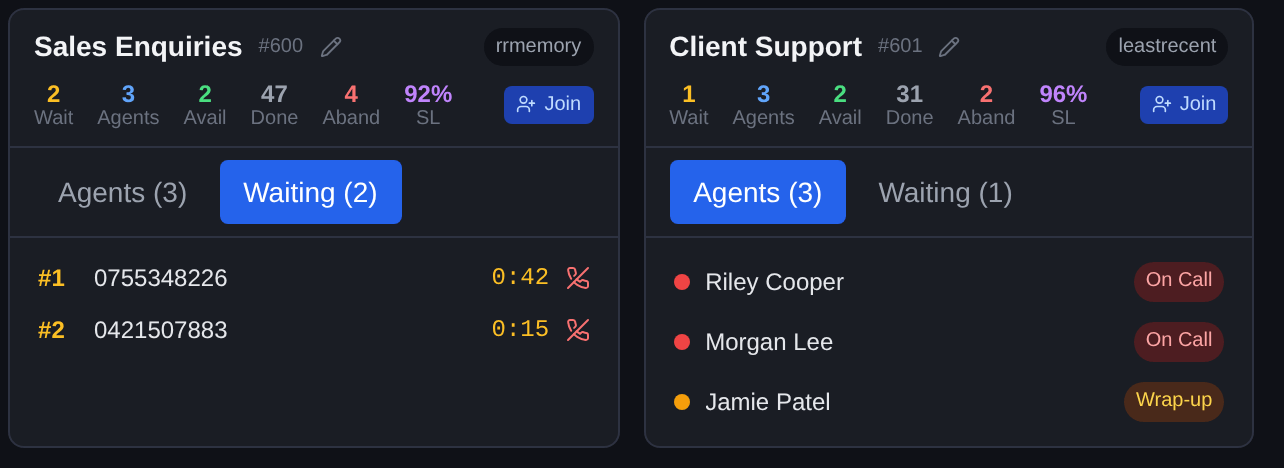
Two live queues. Each waiting caller shows a position and a running timer that changes colour once it passes the service-level target, and each agent shows as idle, on a call, or paused with a reason the whole team can see. The tiles above each queue carry the current service level with completed and abandoned counts.
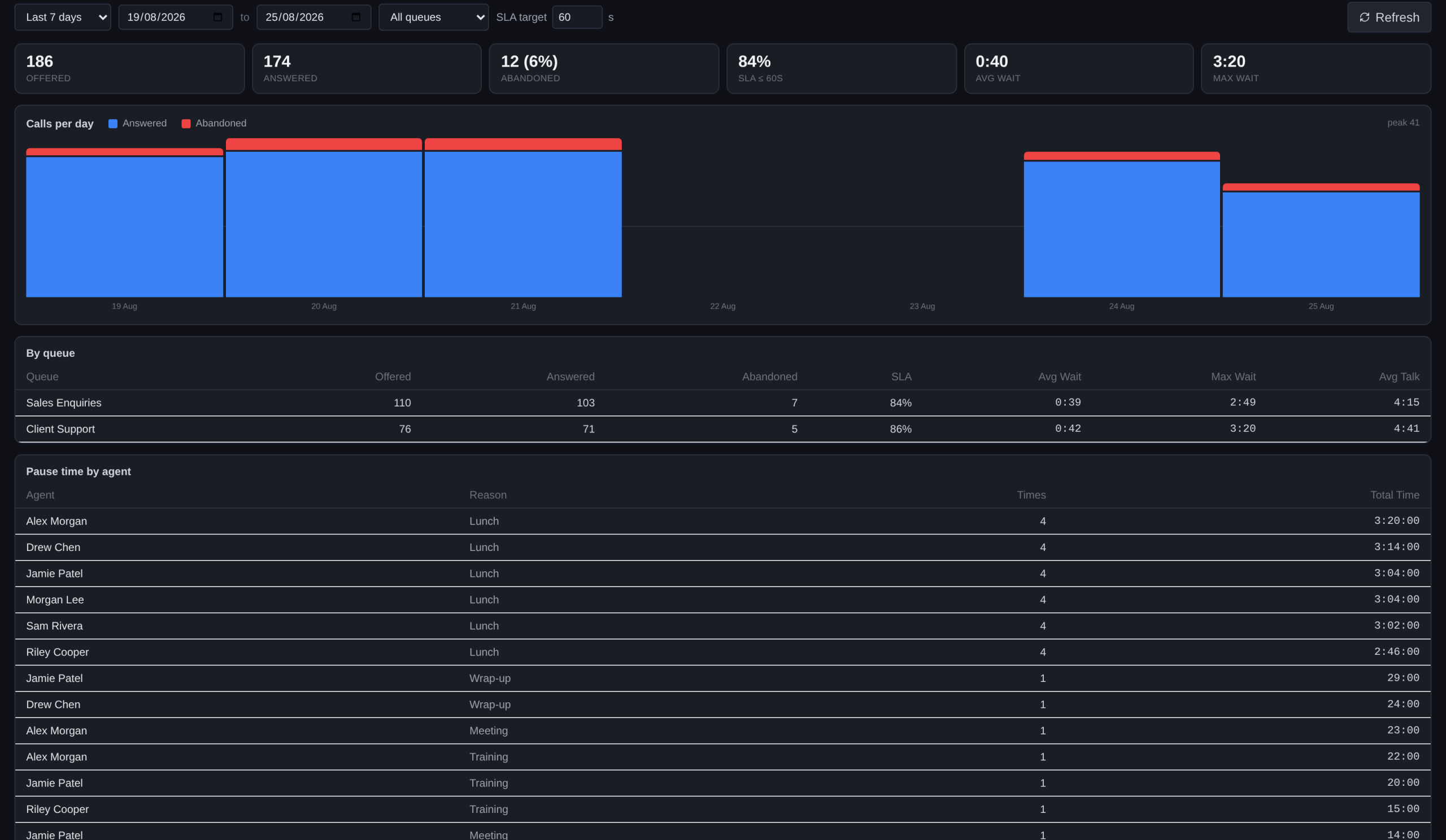
The Reports tab for a selected week. Headline tiles cover calls offered, answered and abandoned, the service level against your answer-time target, and average and worst wait. Underneath, answered against abandoned calls plotted day by day, or hour by hour when you drill into a single day, with breakdowns per queue and per agent.
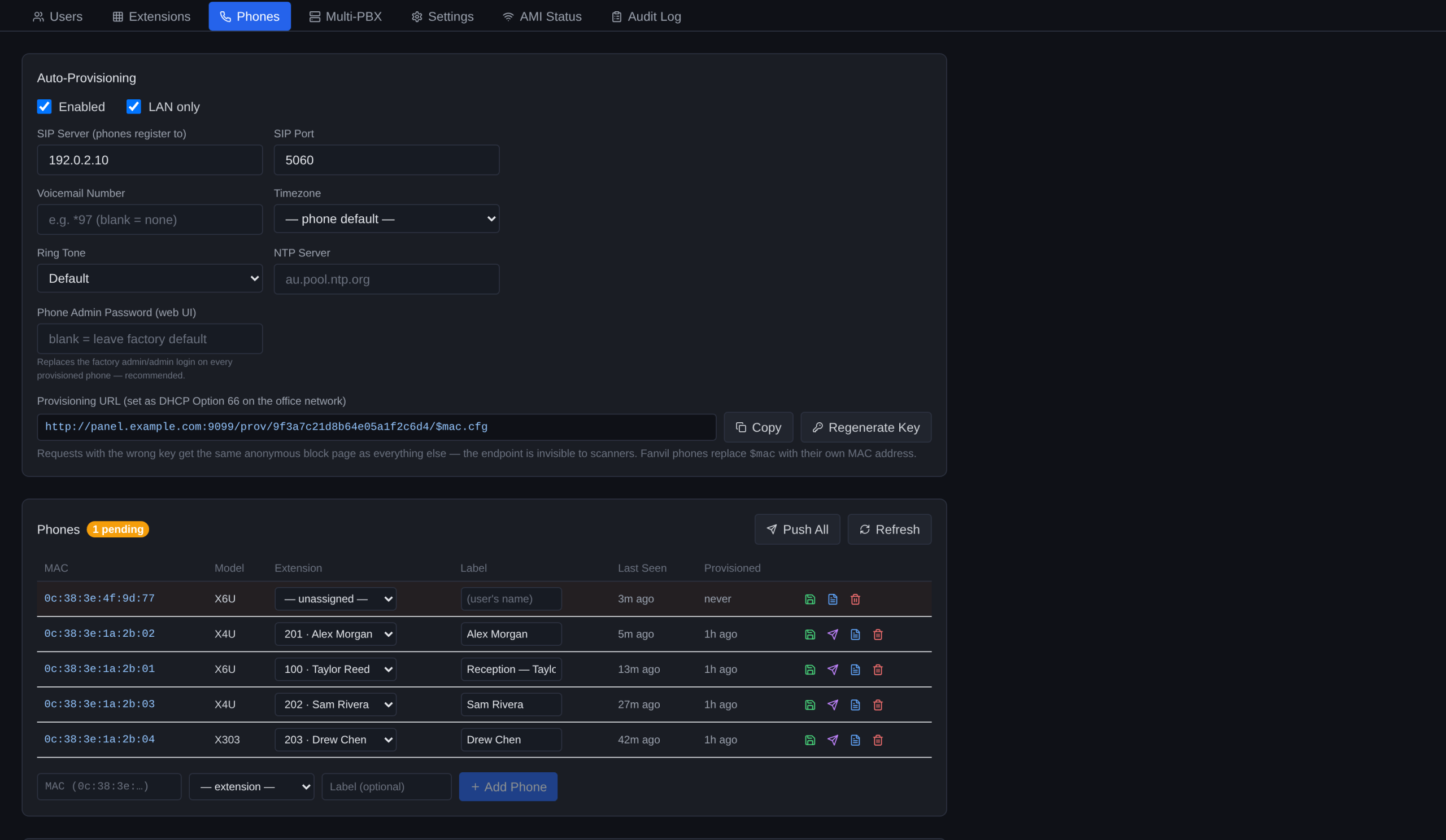
Admin, Phones. Handsets already adopted appear with the extension they are registered to. A factory-reset phone plugged in at an empty desk shows up on its own as a pending device: adopt it, pick the extension, and PROP pushes the SIP registration, the busy-lamp side keys for the whole team, and your wallpaper. Nobody touches the phone’s menus.
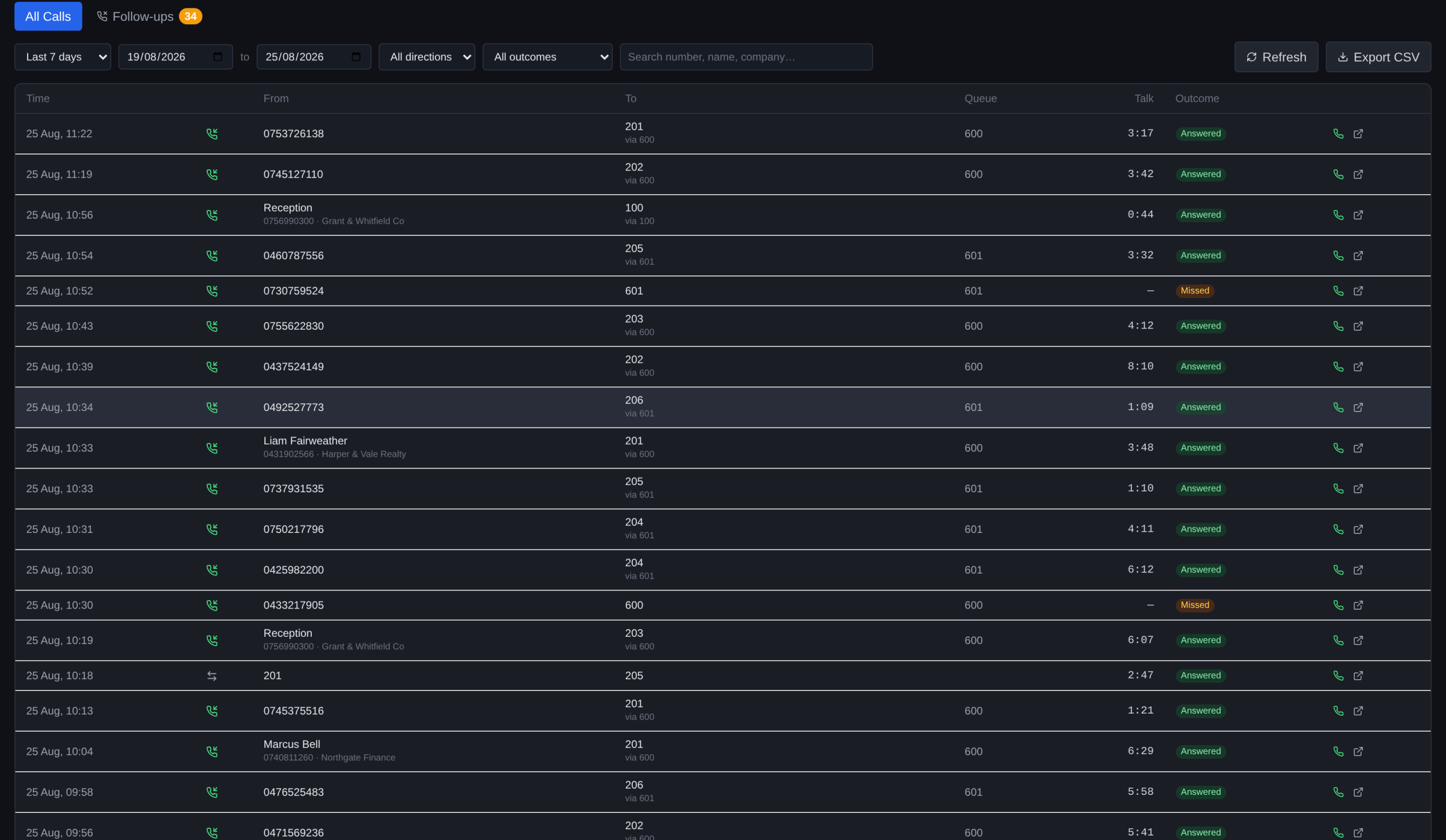
A morning of call history. Every inbound, outbound and internal call with its direction, the number or queue involved, how long it was waiting, how long it talked, and how it ended. Names and companies come from the shared address book. Filter by date, direction or outcome, redial in one click, or export whatever you are looking at to CSV.