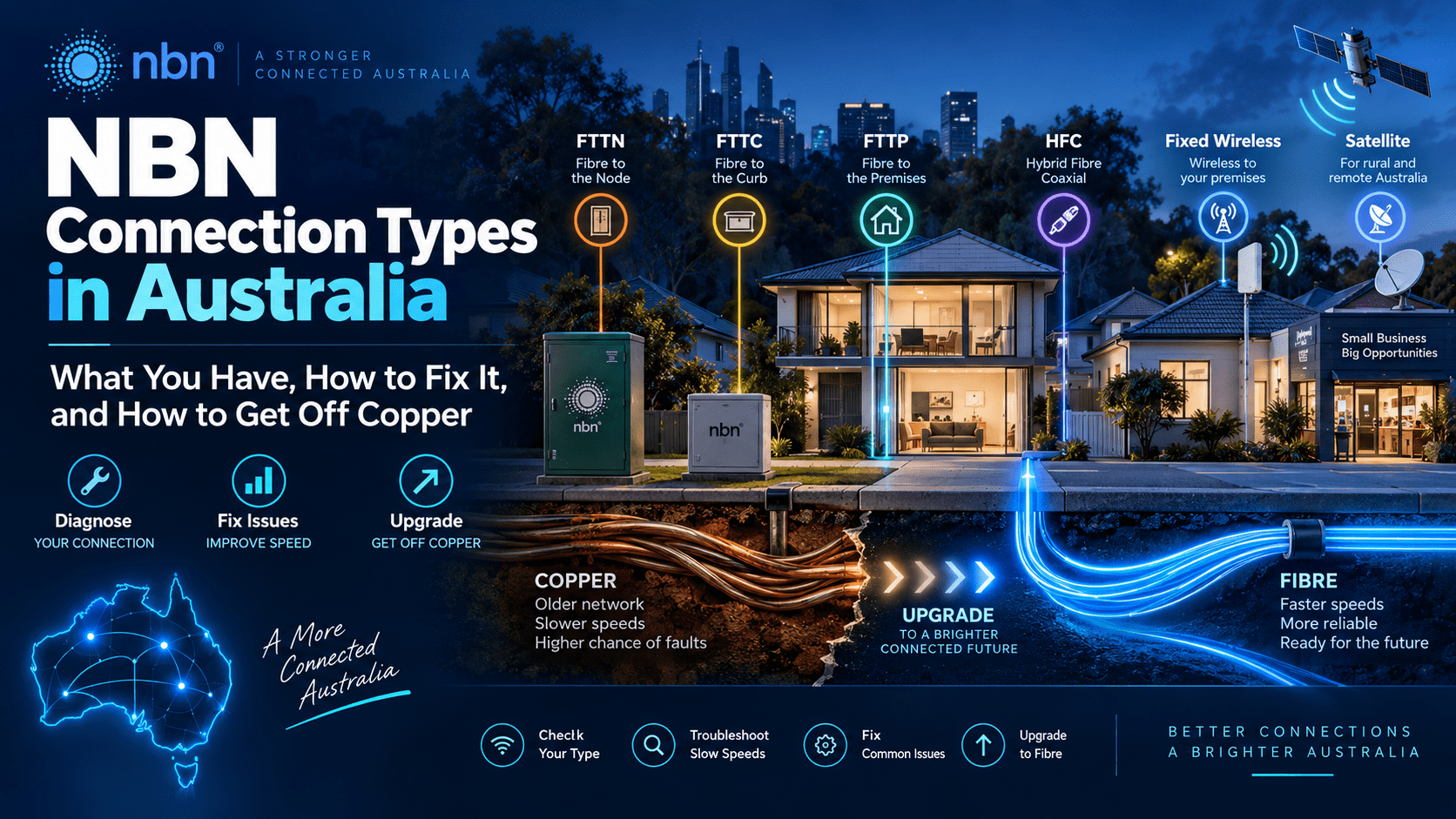
Seven different technologies deliver the NBN to Australian homes and businesses, and they fail in different ways. The fix for a dropout on FTTN has nothing in common with the fix for a dropout on HFC, and half the “NBN is down” calls we take on the Gold Coast turn out to be the router, the Wi-Fi or the plan.
This guide covers each connection type, how to work out which one you have, what to check before you sit on hold to your provider, and how the free fibre upgrade works now that NBN Co has started retiring copper.
The short version
The seven NBN technology types
Each one uses fibre for most of the distance and something else for the last stretch. That last stretch decides your maximum speed, what equipment sits in your house, and where faults tend to happen.
| Type | Last stretch | Top plan | In the house |
|---|---|---|---|
| FTTP Fibre to the Premises |
Fibre all the way in | 2000/200 | A white NBN Connection Box (NTD) on the wall with its own power supply, often with a battery backup slot. Your router plugs into UNI-D1 by Ethernet. Common in new estates and anywhere that has taken the upgrade. |
| FTTN Fibre to the Node |
Copper phone line from a street cabinet, up to a kilometre | 100/20, if the line can do it | No NBN equipment at all. A VDSL modem-router plugs straight into the old phone socket. Speed falls with distance from the node and with the state of the copper. The technology NBN Co most wants gone. |
| FTTC Fibre to the Curb |
Copper from a pit outside your boundary, usually under 150 m | 100/20 | A small black NBN Connection Device (NCD) that plugs into the phone socket and powers the street unit through the copper. Router connects to it by Ethernet. |
| FTTB Fibre to the Building |
Copper from the building’s comms room | 100/20 | Same as FTTN inside the apartment: a VDSL modem-router in the phone socket. Better than FTTN in practice because the copper run is short. |
| HFC Hybrid Fibre Coaxial |
Coaxial cable, the old Foxtel and Optus cable network | 2000/100 | A black Arris NTD with a coax screw connector and its own power pack. Router plugs in by Ethernet. Most of the Gold Coast from Southport to Burleigh is HFC. |
| Fixed Wireless | Radio link to a tower, up to about 14 km | Up to 400 Mbps on the upgraded towers | An outdoor antenna on the roof or eave, a cable to an indoor NTD. Tower congestion in the evening and trees growing into the line of sight are the usual complaints. Hinterland and acreage blocks. |
| Sky Muster Satellite |
Geostationary satellite | 100/5 on Sky Muster Plus | Dish and indoor NTD. Latency of 600 ms and up, which is why video calls lag. Many rural customers have moved to Starlink; NBN Co is now selling Starlink-based services through the same retailers. |
The speed tiers changed in September 2025. NBN Co lifted the wholesale speeds on full fibre and HFC at no extra cost: the 100 Mbps tier became 500/50, 250 became 750/50, 1000 became 1000/100, and a new 2000 Mbps tier arrived. Copper connections got none of it. If your provider still shows you a 100/20 plan as the fastest option, you are on FTTN, FTTC or FTTB.
Which one do I have?
Type your address into the NBN Co address checker. It shows the technology at your premises and whether a fibre upgrade is available. If you would rather look at the wall: a phone socket with a modem in it and no NBN box is FTTN or FTTB. A small black box with an NBN logo and a phone cable is FTTC. A larger box with a screw-on coax lead is HFC. A white box with a fibre cable and a separate power supply is FTTP.
Troubleshooting, in order
Work through these before calling anyone. Your provider will ask you to do most of them anyway, and doing them first saves you the 40 minutes of hold time.
1. Check for an outage
NBN Co publishes planned and unplanned outages by address on its network status page. Your provider’s status page and the Aussie Outages site cover the retailer’s own network. If it is listed, nothing you do at home will help.
2. Read the lights
Every NBN box tells you where the fault is. A solid power light and a dead or red Optical, DSL, Connection or Signal light means the problem is between the box and the street, which is NBN Co’s side. All green on the NBN box and no internet means the router or the provider.
3. Power cycle, in the right order
Unplug the NBN box and the router. Wait 30 seconds. Power the NBN box first and wait for its connection light to settle, which can take five minutes on HFC. Then power the router. Doing it the other way round leaves the router waiting on a link that was not there when it booted.
4. Test on a cable
Plug a laptop into the router by Ethernet and run a speed test. If the wired result matches your plan, the NBN is fine and the problem is Wi-Fi. If the wired result is low too, keep going.
5. Bypass your own gear
On FTTP, FTTC and HFC you can plug a laptop straight into the NBN box and set up a PPPoE or DHCP connection with your provider’s login. If that works and the router does not, the router is the fault. On FTTN, swap in a known-good VDSL modem if you have one.
6. Log the fault properly
Tell your provider what you tested and what the lights show. A ticket that says “no sync light on the NCD after a power cycle” gets an NBN technician booked. “Internet slow” gets you a script. If the provider will not resolve it, the Telecommunications Industry Ombudsman takes complaints for free.
What to look at on each technology
| Type | Common faults | What to check |
|---|---|---|
| FTTN / FTTB | Dropouts in wet weather, sync speed far below the plan, connection drops when the phone rings or a fridge starts. | Log into the modem and note the DSL sync rate and line attenuation. A 100 plan that syncs at 45 Mbps is a line issue, and your provider must move you to a cheaper tier or fix it. Remove every other device from the phone sockets; an old alarm dialler or a Foxtel box on the line will wreck sync. Try the first socket in the house, before any extension wiring. |
| FTTC | NCD stuck with a flashing Connection light, or no lights at all. | The NCD has to be plugged into a live phone socket with its own cable and power pack; it sends power down the copper to the unit in the pit, so a cheap phone extension lead can starve it. Solid red Connection light means the street unit is not responding, which is NBN Co’s job. |
| FTTP | Rare. Usually a cut fibre from landscaping, a dead power supply, or a router plugged into the wrong UNI-D port. | Optical light should be solid green. Red means no light on the fibre, and only NBN Co can fix it. Confirm the Ethernet cable is in the port your provider activated; UNI-D1 is the default and the others are dead unless a second service is ordered. |
| HFC | Slow evenings, the Online light cycling, dropouts after rain. | Check the coax is finger-tight at the NTD and the wall plate, and that there is no old splitter feeding a dead Foxtel outlet. Water in the lead-in on the outside wall is the usual rain fault. HFC shares bandwidth in the street, so if wired speeds are fine at 10am and poor at 8pm, report it as congestion. |
| Fixed Wireless | Speeds that vary through the day, dropouts in heavy rain, slow decline over months. | The indoor NTD shows signal bars; two or fewer is a poor link. Look at what has grown between the antenna and the tower since installation. A tree is the most common cause of a connection that was fine two years ago. |
| Sky Muster | Everything is slow, video calls freeze, cloud apps time out. | Latency is the design, not a fault. Check the dish for movement or growth, then ask your provider about the Starlink-based service NBN Co now offers at the same addresses. |
Things that get blamed on the NBN and are not the NBN
| × | Wi-Fi. The NBN ends at the router. A router in a cupboard at one end of a rendered brick house will not reach the other end, and no plan upgrade changes that. Wired test first, always. |
| × | The router your provider posted out. Free routers are built to a price. Many cannot route more than 300 to 500 Mbps and most have weak radios. If you took the 500/50 upgrade and see 250 on a cable, look at the router before the line. |
| × | The plan itself. A speed test that returns 48 Mbps on an NBN 50 plan is a working connection. Check what tier you are paying for before you report a fault. |
| × | DNS. Pages that hang before loading, while speed tests look fine, point at the provider’s DNS servers. Set the router to 1.1.1.1 or 9.9.9.9 and see if it clears. |
| × | CGNAT. Cameras, VPNs and game servers that stopped being reachable from outside are usually behind carrier-grade NAT, which most providers now apply by default. Ask for a static or public IP; some charge a few dollars a month for it. |
Getting off FTTN: the fibre upgrade
NBN Co’s Fibre Connect program has made more than five million FTTN and FTTC premises eligible for a free upgrade to full fibre. The upgrade replaces the copper lead-in with a fibre lead-in to your house and installs an FTTP connection box inside. Your provider orders it, NBN Co does the work, and there is no charge for a standard install.
Two ways to get there
What the install involves
An NBN contractor runs fibre from the pit to your external wall, usually along the same route as the old copper. Underground lead-ins need a small trench or an existing conduit; overhead ones use the existing pole. A second visit, or the same visit if the outside work is simple, fits the connection box inside within a few metres of a power point. You need to be home for the inside work. If you want the box somewhere other than where the phone socket is, tell the technician on the day; non-standard runs can attract a charge, but most reasonable requests are done for free.
Your phone line goes with the copper. Anything still using the old phone socket stops working after the upgrade: a back-to-base alarm dialler, a fax, a lift phone, a medical alert pendant, or a handset plugged into the wall. Move these to a VoIP service or a mobile-based alarm communicator before the install date, not after.
Business premises
The same upgrade applies to business addresses on FTTN, and the case for it is stronger. Business plans moved to 250/100 in the September 2025 uplift, with multi-gigabit tiers above that, and upload speed is what makes cloud backups, Microsoft 365 and video calls feel fast or slow. If your office is in a multi-tenant building, the upgrade may go through NBN Co’s multi-dwelling program, which is slower. Check the address, and if the result says “complex” or nothing at all, ask your provider to raise it with NBN Co.
Links you will need
Your technology type, and whether a fibre upgrade is available at your premises right now.
Planned maintenance and current outages, searchable by address.
NBN Co’s own pages on each connection type, including the light guide for each box.
The ACCC’s quarterly report on which providers hit their advertised speeds in the evening. Read it before you switch.
Telecommunications Industry Ombudsman
Free dispute resolution when your provider will not fix a fault or honour a speed tier.
Need a hand?
NBN faults, fibre upgrades and Wi-Fi that reaches the whole building
We diagnose NBN problems on site across the Gold Coast, deal with the provider on your behalf, and set up the router, Wi-Fi and phone system so the fibre upgrade goes in without taking your alarm or your phones down with it. If you have been told “it’s working from our end” more than once, give us a call.